Linux Desktop Usage 2019

If I look back now, it must be more than 20 years since I got fascinated with GNU/Linux ecosystem and started using it.

Back then, it was more curiosity of a young teenager and the excitement to learn something. There’s one thing that I have always admired/respected about Free Software’s values, is: Access for everyone to learn. This is something I never forget and still try to do my bit.

[Read More]

Migrating from Drupal to Hugo

TL;DR: Migrating my website from Drupal 7 to Hugo

Jump directly to the end titled Migration to Hugo

Initial website

Looking back at my website’s history, the domain was first registered sometime in 2003. Back then, it was mostly a couple of html pages. Being (and still) a novice in web, my website was mostly on ideas from others. IIRC, for the bare html one, I took a lot of look wise details from Miss Garrels’ website.

[Read More]
Categories: Debian-Blog Computing Tools  Tags: Drupal Drupal 7 Hugo web 

Laptop Mode Tools 1.72

What a way to make a gift!

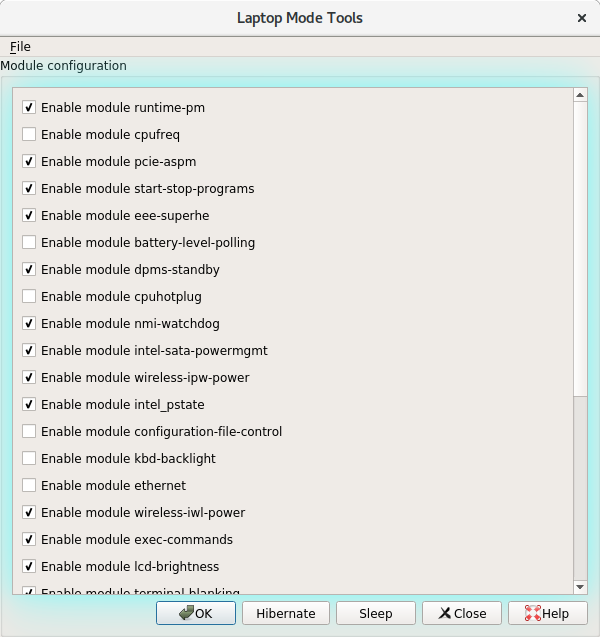
I’m pleased to announce the 1.72 release of Laptop Mode Tools. Major changes include the port of the GUI configuration utility to Python 3 and PyQt5. Some tweaks, fixes and enhancements in current modules. Extending {black,white}list of devices to types other than USB. Listing of devices by their devtype attribute.

A filtered list of changes is mentioned below. For the full log, please refer to the git repository.

[Read More]

Freezing of tasks failed

It is interesting how a user-space task could lead to hinder a Linux kernel software suspend operation.

[11735.155443] PM: suspend entry (deep)
[11735.155445] PM: Syncing filesystems ... done.
[11735.215091] [drm:wait_panel_status [i915]] *ERROR* PPS state mismatch
[11735.215172] [drm:wait_panel_status [i915]] *ERROR* PPS state mismatch
[11735.558676] rfkill: input handler enabled
[11735.608859] (NULL device *): firmware: direct-loading firmware rtlwifi/rtl8723befw_36.bin
[11735.609910] (NULL device *): firmware: direct-loading firmware rtl_bt/rtl8723b_fw.bin
[11735.611871] Freezing user space processes ... 
[11755.615603] Freezing of tasks failed after 20.003 seconds (1 tasks refusing to freeze, wq_busy=0):
[11755.615854] digikam         D    0 13262  13245 0x00000004
[11755.615859] Call Trace:
[11755.615873]  __schedule+0x28e/0x880
[11755.615878]  schedule+0x2c/0x80
[11755.615889]  request_wait_answer+0xa3/0x220 [fuse]
[11755.615895]  ? finish_wait+0x80/0x80
[11755.615902]  __fuse_request_send+0x86/0x90 [fuse]
[11755.615907]  fuse_request_send+0x27/0x30 [fuse]
[11755.615914]  fuse_send_readpages.isra.30+0xd1/0x120 [fuse]
[11755.615920]  fuse_readpages+0xfd/0x110 [fuse]
[11755.615928]  __do_page_cache_readahead+0x200/0x2d0
[11755.615936]  filemap_fault+0x37b/0x640
[11755.615940]  ? filemap_fault+0x37b/0x640
[11755.615944]  ? filemap_map_pages+0x179/0x320
[11755.615950]  __do_fault+0x1e/0xb0
[11755.615953]  __handle_mm_fault+0xc8a/0x1160
[11755.615958]  handle_mm_fault+0xb1/0x200
[11755.615964]  __do_page_fault+0x257/0x4d0
[11755.615968]  do_page_fault+0x2e/0xd0
[11755.615973]  page_fault+0x22/0x30
[11755.615976] RIP: 0033:0x7f32d3c7ff90
[11755.615978] RSP: 002b:00007ffd887c9d18 EFLAGS: 00010246
[11755.615981] RAX: 00007f32d3fc9c50 RBX: 000000000275e440 RCX: 0000000000000003
[11755.615982] RDX: 0000000000000002 RSI: 00007ffd887c9f10 RDI: 000000000275e440
[11755.615984] RBP: 00007ffd887c9f10 R08: 000000000275e820 R09: 00000000018d2f40
[11755.615986] R10: 0000000000000002 R11: 0000000000000000 R12: 000000000189cbc0
[11755.615987] R13: 0000000001839dc0 R14: 000000000275e440 R15: 0000000000000000
[11755.616014] OOM killer enabled.
[11755.616015] Restarting tasks ... done.
[11755.817640] PM: suspend exit
[11755.817698] PM: suspend entry (s2idle)
[11755.817700] PM: Syncing filesystems ... done.
[11755.983156] rfkill: input handler disabled
[11756.030209] rfkill: input handler enabled
[11756.073529] Freezing user space processes ... 
[11776.084309] Freezing of tasks failed after 20.010 seconds (2 tasks refusing to freeze, wq_busy=0):
[11776.084630] digikam         D    0 13262  13245 0x00000004
[11776.084636] Call Trace:
[11776.084653]  __schedule+0x28e/0x880
[11776.084659]  schedule+0x2c/0x80
[11776.084672]  request_wait_answer+0xa3/0x220 [fuse]
[11776.084680]  ? finish_wait+0x80/0x80
[11776.084688]  __fuse_request_send+0x86/0x90 [fuse]
[11776.084695]  fuse_request_send+0x27/0x30 [fuse]
[11776.084703]  fuse_send_readpages.isra.30+0xd1/0x120 [fuse]
[11776.084711]  fuse_readpages+0xfd/0x110 [fuse]
[11776.084721]  __do_page_cache_readahead+0x200/0x2d0
[11776.084730]  filemap_fault+0x37b/0x640
[11776.084735]  ? filemap_fault+0x37b/0x640
[11776.084743]  ? __update_load_avg_blocked_se.isra.33+0xa1/0xf0
[11776.084749]  ? filemap_map_pages+0x179/0x320
[11776.084755]  __do_fault+0x1e/0xb0
[11776.084759]  __handle_mm_fault+0xc8a/0x1160
[11776.084765]  handle_mm_fault+0xb1/0x200
[11776.084772]  __do_page_fault+0x257/0x4d0
[11776.084777]  do_page_fault+0x2e/0xd0
[11776.084783]  page_fault+0x22/0x30
[11776.084787] RIP: 0033:0x7f31ddf315e0
[11776.084789] RSP: 002b:00007ffd887ca068 EFLAGS: 00010202
[11776.084793] RAX: 00007f31de13c350 RBX: 00000000040be3f0 RCX: 000000000283da60
[11776.084795] RDX: 0000000000000001 RSI: 00000000040be3f0 RDI: 00000000040be3f0
[11776.084797] RBP: 00007f32d3fca1e0 R08: 0000000005679250 R09: 0000000000000020
[11776.084799] R10: 00000000058fc1b0 R11: 0000000004b9ac50 R12: 0000000000000000
[11776.084801] R13: 0000000000000001 R14: 0000000000000000 R15: 0000000000000000
[11776.084806] QXcbEventReader D    0 13268  13245 0x00000004
[11776.084810] Call Trace:
[11776.084817]  __schedule+0x28e/0x880
[11776.084823]  schedule+0x2c/0x80
[11776.084827]  rwsem_down_write_failed_killable+0x25a/0x490
[11776.084832]  call_rwsem_down_write_failed_killable+0x17/0x30
[11776.084836]  ? call_rwsem_down_write_failed_killable+0x17/0x30
[11776.084842]  down_write_killable+0x2d/0x50
[11776.084848]  do_mprotect_pkey+0xa9/0x2f0
[11776.084854]  SyS_mprotect+0x13/0x20
[11776.084859]  system_call_fast_compare_end+0xc/0x97
[11776.084861] RIP: 0033:0x7f32d1f7c057
[11776.084863] RSP: 002b:00007f32cbb8c8d8 EFLAGS: 00000206 ORIG_RAX: 000000000000000a
[11776.084867] RAX: ffffffffffffffda RBX: 00007f32c4000020 RCX: 00007f32d1f7c057
[11776.084869] RDX: 0000000000000003 RSI: 0000000000001000 RDI: 00007f32c4024000
[11776.084871] RBP: 00000000000000c5 R08: 00007f32c4000000 R09: 0000000000024000
[11776.084872] R10: 00007f32c4024000 R11: 0000000000000206 R12: 00000000000000a0
[11776.084874] R13: 00007f32c4022f60 R14: 0000000000001000 R15: 00000000000000e0
[11776.084906] OOM killer enabled.
[11776.084907] Restarting tasks ... done.
[11776.289655] PM: suspend exit
[11776.459624] IPv6: ADDRCONF(NETDEV_UP): wlp1s0: link is not ready
[11776.469521] rfkill: input handler disabled
[11776.978733] IPv6: ADDRCONF(NETDEV_UP): wlp1s0: link is not ready
[11777.038879] IPv6: ADDRCONF(NETDEV_UP): wlp1s0: link is not ready
[11778.022062] wlp1s0: authenticate with 50:8f:4c:82:4d:dd
[11778.033155] wlp1s0: send auth to 50:8f:4c:82:4d:dd (try 1/3)
[11778.038522] wlp1s0: authenticated
[11778.041511] wlp1s0: associate with 50:8f:4c:82:4d:dd (try 1/3)
[11778.059860] wlp1s0: RX AssocResp from 50:8f:4c:82:4d:dd (capab=0x431 status=0 aid=5)
[11778.060253] wlp1s0: associated
[11778.060308] IPv6: ADDRCONF(NETDEV_CHANGE): wlp1s0: link becomes ready
[11778.987669] [drm:wait_panel_status [i915]] *ERROR* PPS state mismatch
[11779.117608] [drm:wait_panel_status [i915]] *ERROR* PPS state mismatch
[11779.160930] [drm:wait_panel_status [i915]] *ERROR* PPS state mismatch
[11779.784045] [drm:wait_panel_status [i915]] *ERROR* PPS state mismatch
[11779.913668] [drm:wait_panel_status [i915]] *ERROR* PPS state mismatch
[11779.961517] [drm:wait_panel_status [i915]] *ERROR* PPS state mismatch
11:58 ♒♒♒   ☺    

apt-offline 1.8.1 released

apt-offline 1.8.1 [released](https://github.com/rickysarraf/apt- offline/releases/tag/v1.8.1).

This is a bug fix release fixing some python3 glitches related to module imports. Recommended for all users.

apt-offline (1.8.1) unstable; urgency=medium

  • Switch setuptools to invoke py3
  • No more argparse needed on py3
  • Fix genui.sh based on comments from pyqt mailing list
  • Bump version number to 1.8.1

-- Ritesh Raj Sarraf rrs@debian.org Sat, 01 Jul 2017 21:39:24 +0545

What is apt-offline

Description: offline APT package manager
 apt-offline is an Offline APT Package Manager.
 .
 apt-offline can fully update and upgrade an APT based distribution without
 connecting to the network, all of it transparent to APT.
 .
 apt-offline can be used to generate a signature on a machine (with no network).
 This signature contains all download information required for the APT database
 system. This signature file can be used on another machine connected to the
 internet (which need not be a Debian box and can even be running windows) to
 download the updates.
 The downloaded data will contain all updates in a format understood by APT and
 this data can be used by apt-offline to update the non-networked machine.
 .
 apt-offline can also fetch bug reports and make them available offline.
apt-offline 1.8.0 released

I am pleased to announce the release of apt-offline , version 1.8.0. This release is mainly a forward port of apt-offline to Python 3 and PyQt5. There are some glitches related to Python 3 and PyQt5, but overall the CLI interface works fine. Other than the porting, there’s also an important bug fixed, related to memory leak when using the MIME library. And then there’s some updates to the documentation (user examples) based on feedback from users.

[Read More]

Fixing Hardware Bugs

Bugs can be annoying. Especially the ones that crash or hang and do not have a root cause. A good example of such annoyance can be kernel bugs, where a faulty hardware/device driver hinders the kernel’s suspend/resume process. Because, as a user, while in the middle of your work, you suspend your machine hoping to resume your work, back when at your destination. But, during suspend, or during resume, randomly the bug triggers leaving you with no choice but a hardware reset. Ultimately, resulting in you losing the entire work state you were in.

[Read More]
Categories: Debian-Blog Rant Computing  Tags: Lenovo linux usb Realtek 

Setting up appliances - the new way

I own a Fitbit Surge. But Fitibit chose to remain exclusive in terms of interoperability. Which means to make any sense out of the data that the watch gathers, you need to stick with what Fitbit mandates. Fair enough in today’s trends. It also is part of their business model to restrict useful aspects of the report to **Premium Membership. **Again, fair enough in today’s business' trends.

But a nice human chose to write a bridge; to extract Fitbit data and feed into Google Fit. The project is written in Python, so you can get it to work on most common computer platforms. I never bothered to package this tool for Debian, because I never was sure when I’d throw away the Fitbit. But until that happens, I decided to use the tool to sync my data to Google Fit. Which led me to requirements.txt

[Read More]

Linux Tablet-Mode Usability

In my ongoing quest to get Tablet-Mode working on my Hybrid machine, here’s how I’ve been living with it so far. My intent is to continue using Free Software for both use cases. My wishful thought is to use the same software under both use cases.

  • Browser: On the browser front, things are pretty decent. Chromium has good support for Touchscreen input. Most of the Touchscreen use cases work well with Chromium. On the Firefox side, after a huge delay, finally, Firefox seems to be catching up. Hopefully, with Firefox 51/52, we’ll have a much more usable Touchscreen browser.
  • Desktop Shell: One of the reason of migrating to GNOME was its touch support. From what I’ve explored so far, GNOME is the only desktop shell that has touch support natively done. The feature isn’t complete yet, but is fairly well usable.
    • Given that GNOME has touchscreen support native, it is obvious to be using GNOME equivalent of tools for common use cases. Most of these tools inherit the touchscreen capabilities from the underneath GNOME libraries.
    • File Manager: Nautilus has decent support for touch, as a file manager. The only annoying bit is a right-click equivalent. Or in touch input sense, a long-press.
    • Movie Player: There’s a decent movie player, based on GNOME libs; GNOME MPV. In my limited use so far, this interface seems to have good support. Other contenders are:
      • SMPlayer is based on Qt libs. So initial expectation would be that Qt based apps would have better Touch support. But I’m yet to see any serious Qt application with Touch input support. Back to SMPlayer, the dev is pragmatic enough to recognize tablet-mode users and as such has provided a so called “Tablet Mode” view for SMPlayer (The tooltip did not get captured in the screenshot).
      • MPV doesn’t come with a UI but has basic management with OSD. And in my limited usage, the OSD implementation does seem capable to take touch input.
  • Books / Documents: GNOME Documents/Books is very basic in what it has to offer, to the point that it is not much useful. But since it is based on the same GNOME libraries, it enjoys native touch input support. Calibre , on the other hand, is feature rich. But it is based on (Py)Qt. Touch input is told to work for Windows. For Linux, there’s no support yet. The good thing about Calibre is that it has its own UI, which is pretty decent in a Tablet-Mode Touch workflow.
  • Photo Management: With compact digital devices commonly available, digital content (Both Photos and Videos) is on the rise. The most obvious names that come to mind are Digikam and Shotwell.
    • Shotwell saw its reincarnation in the recent past. From what I recollect, it does have touch support but was lacking quite a bit in terms of features, as compared to Digikam.
    • Digikam is an impressive tool for digital content management. While Digikam is a KDE project, thankfully it does a great job in keeping its KDE dependencies to a bare minimum. But given that Digikam builds on KDE/Qt libs, I haven’t had any much success in getting a good touch input solution for Tablet Mode. To make it barely usable in Table-Mode, one could choose a theme preference with bigger toolbars, labels and scrollbars. This helps in making a touch input workaround use case. As you can see, I’ve configured the Digikam UI with Text alongside Icons for easy touch input.
  • Email : The most common use case. With Gmail and friends, many believe standalone email clients are no more a need. But there always are users like us who prefer emails offline, encrypted emails and prefer theis own email domains. Many of these are still doable with free services like Gmail, but still.
    • Thunderbird shows its age at times. And given the state of Firefox in getting touch support (and GTK3 port), I see nothing happening with TB.
    • KMail was something I discontinued while still being on KDE. The debacle that KDEPIM was, is something I’d always avoid, in the future. Complete waste of time/resource in building, testing, reporting and follow-ups.
    • Geary is another email client that recently saw its reincarnation. I recently had explored Geary. It enjoys similar benefits like the rest applications using GNOME libraries. There was one touch input bug I found, but otherwise Geary’s featureset was limited in comparison to Evolution.
    • Migration to Evolution , when migrating to GNOME, was not easy. GNOME’s philosophy is to keep things simple and limited. In doing that, they restrict possible flexibilities that users may find obvious. This design philosophy is easily visible across all applications of the GNOME family. Evolution is no different. Hence, coming from TB to E was a small unlearning + newLearning curve. And since Evolution is using the same GNOME libraries, it enjoys similar benefits. Touch input support in Evolution is fairly good. The missing bit is the new Toolbar and Menu structure that many have noticed in the newer GNOME applications (Photos, Documents, Nautilus etc). If only Evolution (and the GNOME family) had the option of customization beyond the developer/project’s view, there wouldn’t be any wishful thoughts.
      • Above is a screenshot of 2 windows of Evoluiton. In its current form too, Evolution is a gem at times. For my RSS feeds, they are stored in a VFolder in Evolution, so that I can read them when offline. RSS feeds are something I read up in Tablet-mode. On the right is an Evolution window with larger fonts, while on the left, Evoltuion still retains its default font size. This current behavior helps me get Table-Mode Touch working to an extent. In my wishful thoughts, I wish if Evolution provided flexibility to change Toolbar icon sizes. That’d really help easily touch the delete button when in Tablet Mode. A simple button, Tablet Mode , like what SMPlayer has done, would keep users sticky with Evolution.

My wishful thought is that people write (free) software, thinking more about usability across toolkits and desktop environments. Otherwise, the year of the Linux desktop , laptop , tablet; in my opinion, is yet to come. And please don’t rip apart tools, in porting them to newer versions of the toolkits. When you rip a tool, you also rip all its QA, Bug Reporting and Testing, that was done over the years.

[Read More]

Laptop Mode Tools 1.71

I am pleased to announce the 1.71 release of Laptop Mode Tools. This release includes some new modules, some bug fixes, and there are some efficiency improvements too. Many thanks to our users; most changes in this release are contributions from our users.

A filtered list of changes in mentioned below. For the full log, please refer to the git repository.

Source tarball, Feodra/SUSE RPM Packages available at:
https://github.com/rickysarraf/laptop-mode-tools/releases

Debian packages will be available soon in Unstable.

[Read More]