apt-offline - 1.3

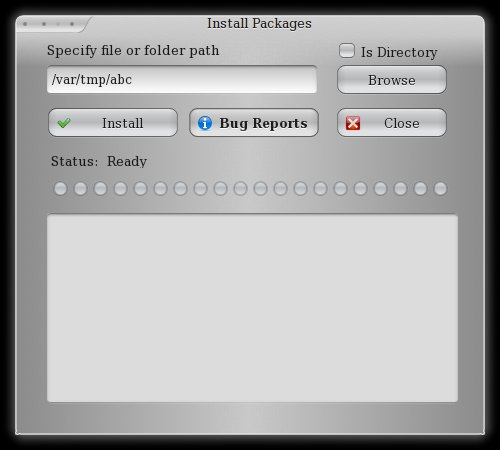
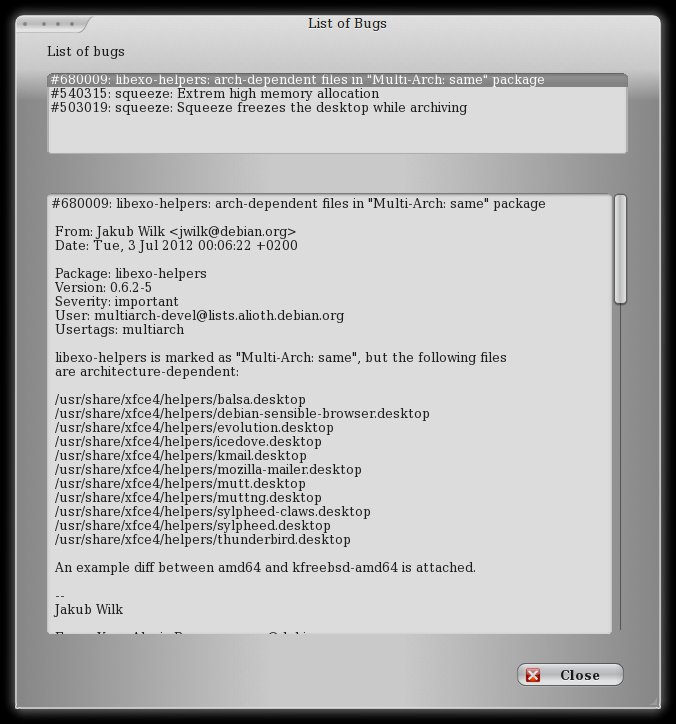
It is still 2012 in this part of the world and the world is still intact. Since nothing major happened, I thought of spending the new gifted time to add a long pending item to apt-offline. As shown in the screen shots, apt- offline’s GUI now has support to detect and display the downloaded offline bug reports.

This is part of the just released, version 1.3.

Reporting bugs with Apport - III

Hello World. This is the follow-up to the last [2](http://blog/report-bugs- with-apport) updates on the state of apport in Debian.

A lot has changed since the last update on Apport. Currently, in Experimental, we have version 2.6.1-2. With this version, and going forward, there will be no hacks to make it work for Debian. Thanks to Martin Pitt, with his assistance, Apport now has a very basic crashdb in place for Debian. The Debian crashdb provides Apport the interface to interact with the Debian BTS.

[Read More]
Categories: Debian-Pages Debian-Blog Computing Tools  Tags: apport 

Laptop Mode Tools - 1.61

Laptop Mode Tools, version 1.61, has been released and will land up soon for Debian. This is the version that would be targetting Wheezy.
This release includes many bug fixes and should make power savings much better on your machines.

This is mainly a bug fix release. Some parallel module execution approach has been used which could show runtime improvements.

Changelog:

1.61 - Thu May 17 17:44:26 IST 2012
* Handle devices with persistent device naming. This fixes the issues where
you don’t have a disk referenced by a block name, the commit= value was
completely skipped
* Fix issue where hdparm skips SSDs for power management
* Add parallel execution for the modules. In theory this should speeden up the
execution. See git commit log comments for details
* Add support for non-deafult customized settings
* calculate design_capacity_warning on machines/arches where it is not readily
available

[Read More]

Seagate FreeAgent GoFlex

I recently purchased a Seagate FreeAgent GoFlex 1 TB hard drive. It is a 2.5" compact disk that you connect over USB. It draws its power from the USB controller. My previous Extern HDDs were all 2.5" laptop drives, for which I bought a USB enclosure. Those devices always worked perfect, as in:

  • They were automatically detected
  • Partitions/File Systems understood
  • Desktop systems would prompt for actions

The typical kernel messages I got for these devices were:

[Read More]
Categories: Debian-Blog Computing  Tags: scsi usb external hdd 

OpenXenManager

OpenXenManager cleared the NEW queue and is now available in the archive.

What it is:

rrs@champaran:~$ apt-cache show openxenmanager Package: openxenmanagerVersion: 0.r80+dfsg-1Installed-Size: 3051Maintainer: Ritesh Raj Sarraf rrs@debian.orgArchitecture: allDepends: pythonDescription: full-featured graphical management tool for xen using xenapi OpenXenManager is a graphical interface to manage XenServer / Xen Cloud Platform (XCP) hosts through the network . OpenXenManager is an open-source multiplatform clone of XenCenter (Citrix)Homepage: http://sourceforge.net/projects/openxenmanager/Section: adminPriority: extraFilename: pool/main/o/openxenmanager/openxenmanager_0.r80+dfsg- 1_all.debSize: 396322MD5sum: 64df482dac6b99bc3403bcc0740f8718SHA1: 9c746f524c3c29eb88de7ae702c96cbca162f577SHA256: 454641eb26c57ba35ad573a3a8493ac6dbd82f7920c8b926049ef892724147e0

[Read More]

Offline Package Manager - apt-offline

A copy of this article is also available here

This article is about Offline Package Management in Debian. Debian is a pretty well known project. One of the things that makes Debian very popular is APT (a.k.a Advanced Packaging Tool) which allows remote package downloads, upgrades and dependency resolution. Unfortunately it does require a network connection - unless you use apt-offline.

[Read More]

File System corruption and Recovery

So this is the 2nd time I ran into a problem like this again. My FAT32 file system on the external USB HDD, all of a sudden, started reporting:

00:47:32 rrs@champaran:/tmp$ sudo dosfsck /dev/sdb1dosfsck 3.0.9, 31 Jan 2010, FAT32, LFNLogical sector size is zero.

I had been taking a lot of care to ensure that I don’t run into situation like this. No body likes losing data. The good part is that I’ve been lucky enough that, even without backups (now who’s gonna backup a backup disk), I have recovered all my data. All thanks to Christophe GRENIER for Testdisk.

[Read More]

Console Gaming - Sony Playstation 3

I have been thinking of this topic for some time. I am a happy owner of the old Phat PS3 Model. At one time, I use to do a fair amount of gaming on my computers. So when Sony marketed the PlayStation 3 product, it was cool to see a machine that did:

  1. Gaming
  2. Movies, Music, Pictures
  3. Blu-Ray
  4. Ran Linux

I convinced myself to buy a PlayStation 3, that I’d use it for playing with Linux apart from gaming. The regular gaming did not excite any more, perhaps it had to do with the limitation of time. On running Debian on it, was when I realized that the Linux support was merely a joke. The Linux support included running a Linux distribution in a VM with not much access to the full hardware resources. Not a Great Experience

[Read More]

CM7

CyanogenMod does list Samsung Galaxy S in its list of devices, but given that it is marked experimental I was not very confident of trying it out. But yesterday, I took the plunge. Even though experimental, the ROM is pretty good. And the Cyanogen goodness just makes it awesome. This ROM (also being AOSP GingerBread) is Super Fast.

So in a day of use, my impressions:

  • Battery performance has turned out to be better than what I was used to.
  • Cyanogen’s enhancements are pretty impressive.
  • The CyanogenGalaxyS team’s work is of very good quality, even though they’ve marked it experimental. (Thanks codeworkx, coolya and the team)

The CyanogenMod experience is also good because it makes me feel like home, just like our Debian project.

[Read More]

Basic RAM Information

While upgrading the memory (RAM) of my notebook I did a lot of study as to what exact kind of RAM would my notebook use without problems. By the end, while I finalized on what RAM I need for my notebook, I had compiled a small document on Basic RAM Information courtesy Crucial® FAQs.

I hope this guide to be helpful to you but with no warranty though. :-)

Do I have to buy the same size upgrade as the memory module currently

installed in my computer or can I mix different sizes?

[Read More]
Categories: Computing  Tags: RAM SDRAM DDR-RAM