Linux Tablet-Mode Usability

In my ongoing quest to get Tablet-Mode working on my Hybrid machine, here’s how I’ve been living with it so far. My intent is to continue using Free Software for both use cases. My wishful thought is to use the same software under both use cases.

  • Browser: On the browser front, things are pretty decent. Chromium has good support for Touchscreen input. Most of the Touchscreen use cases work well with Chromium. On the Firefox side, after a huge delay, finally, Firefox seems to be catching up. Hopefully, with Firefox 51/52, we’ll have a much more usable Touchscreen browser.
  • Desktop Shell: One of the reason of migrating to GNOME was its touch support. From what I’ve explored so far, GNOME is the only desktop shell that has touch support natively done. The feature isn’t complete yet, but is fairly well usable.
    • Given that GNOME has touchscreen support native, it is obvious to be using GNOME equivalent of tools for common use cases. Most of these tools inherit the touchscreen capabilities from the underneath GNOME libraries.
    • File Manager: Nautilus has decent support for touch, as a file manager. The only annoying bit is a right-click equivalent. Or in touch input sense, a long-press.
    • Movie Player: There’s a decent movie player, based on GNOME libs; GNOME MPV. In my limited use so far, this interface seems to have good support. Other contenders are:
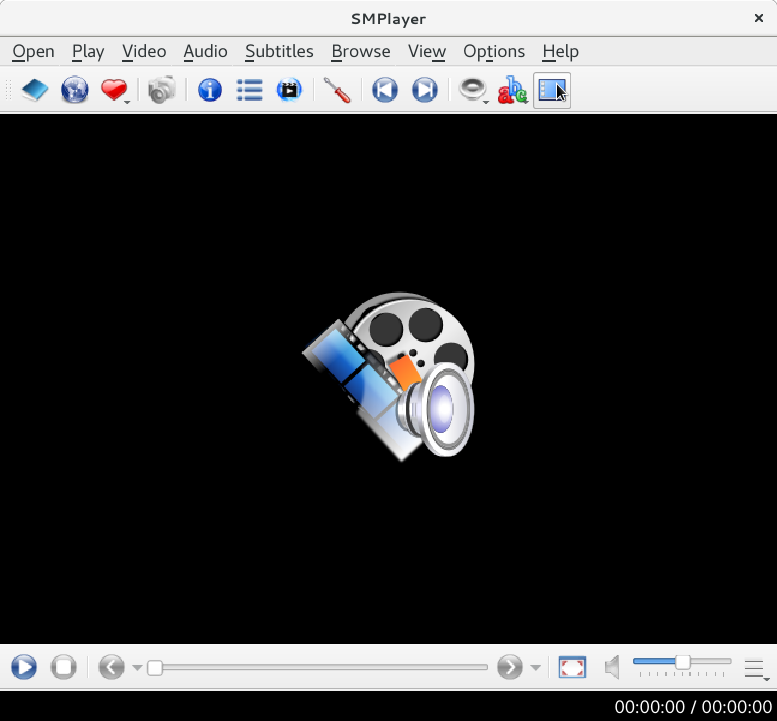
      • SMPlayer is based on Qt libs. So initial expectation would be that Qt based apps would have better Touch support. But I’m yet to see any serious Qt application with Touch input support. Back to SMPlayer, the dev is pragmatic enough to recognize tablet-mode users and as such has provided a so called “Tablet Mode” view for SMPlayer (The tooltip did not get captured in the screenshot).
      • MPV doesn’t come with a UI but has basic management with OSD. And in my limited usage, the OSD implementation does seem capable to take touch input.
  • Books / Documents: GNOME Documents/Books is very basic in what it has to offer, to the point that it is not much useful. But since it is based on the same GNOME libraries, it enjoys native touch input support. Calibre , on the other hand, is feature rich. But it is based on (Py)Qt. Touch input is told to work for Windows. For Linux, there’s no support yet. The good thing about Calibre is that it has its own UI, which is pretty decent in a Tablet-Mode Touch workflow.
  • Photo Management: With compact digital devices commonly available, digital content (Both Photos and Videos) is on the rise. The most obvious names that come to mind are Digikam and Shotwell.
    • Shotwell saw its reincarnation in the recent past. From what I recollect, it does have touch support but was lacking quite a bit in terms of features, as compared to Digikam.
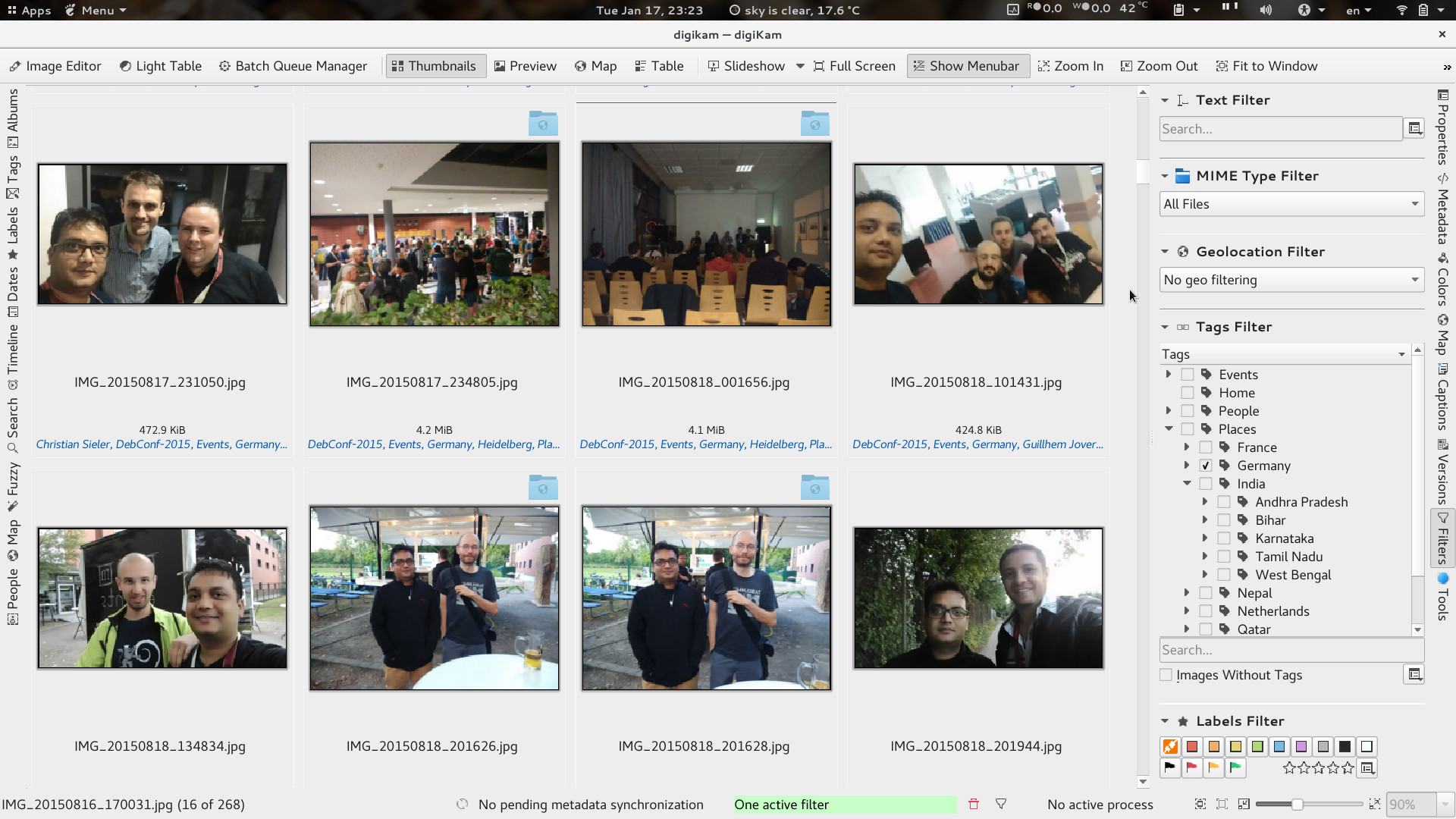
    • Digikam is an impressive tool for digital content management. While Digikam is a KDE project, thankfully it does a great job in keeping its KDE dependencies to a bare minimum. But given that Digikam builds on KDE/Qt libs, I haven’t had any much success in getting a good touch input solution for Tablet Mode. To make it barely usable in Table-Mode, one could choose a theme preference with bigger toolbars, labels and scrollbars. This helps in making a touch input workaround use case. As you can see, I’ve configured the Digikam UI with Text alongside Icons for easy touch input.
  • Email : The most common use case. With Gmail and friends, many believe standalone email clients are no more a need. But there always are users like us who prefer emails offline, encrypted emails and prefer theis own email domains. Many of these are still doable with free services like Gmail, but still.
    • Thunderbird shows its age at times. And given the state of Firefox in getting touch support (and GTK3 port), I see nothing happening with TB.
    • KMail was something I discontinued while still being on KDE. The debacle that KDEPIM was, is something I’d always avoid, in the future. Complete waste of time/resource in building, testing, reporting and follow-ups.
    • Geary is another email client that recently saw its reincarnation. I recently had explored Geary. It enjoys similar benefits like the rest applications using GNOME libraries. There was one touch input bug I found, but otherwise Geary’s featureset was limited in comparison to Evolution.
    • Migration to Evolution , when migrating to GNOME, was not easy. GNOME’s philosophy is to keep things simple and limited. In doing that, they restrict possible flexibilities that users may find obvious. This design philosophy is easily visible across all applications of the GNOME family. Evolution is no different. Hence, coming from TB to E was a small unlearning + newLearning curve. And since Evolution is using the same GNOME libraries, it enjoys similar benefits. Touch input support in Evolution is fairly good. The missing bit is the new Toolbar and Menu structure that many have noticed in the newer GNOME applications (Photos, Documents, Nautilus etc). If only Evolution (and the GNOME family) had the option of customization beyond the developer/project’s view, there wouldn’t be any wishful thoughts.
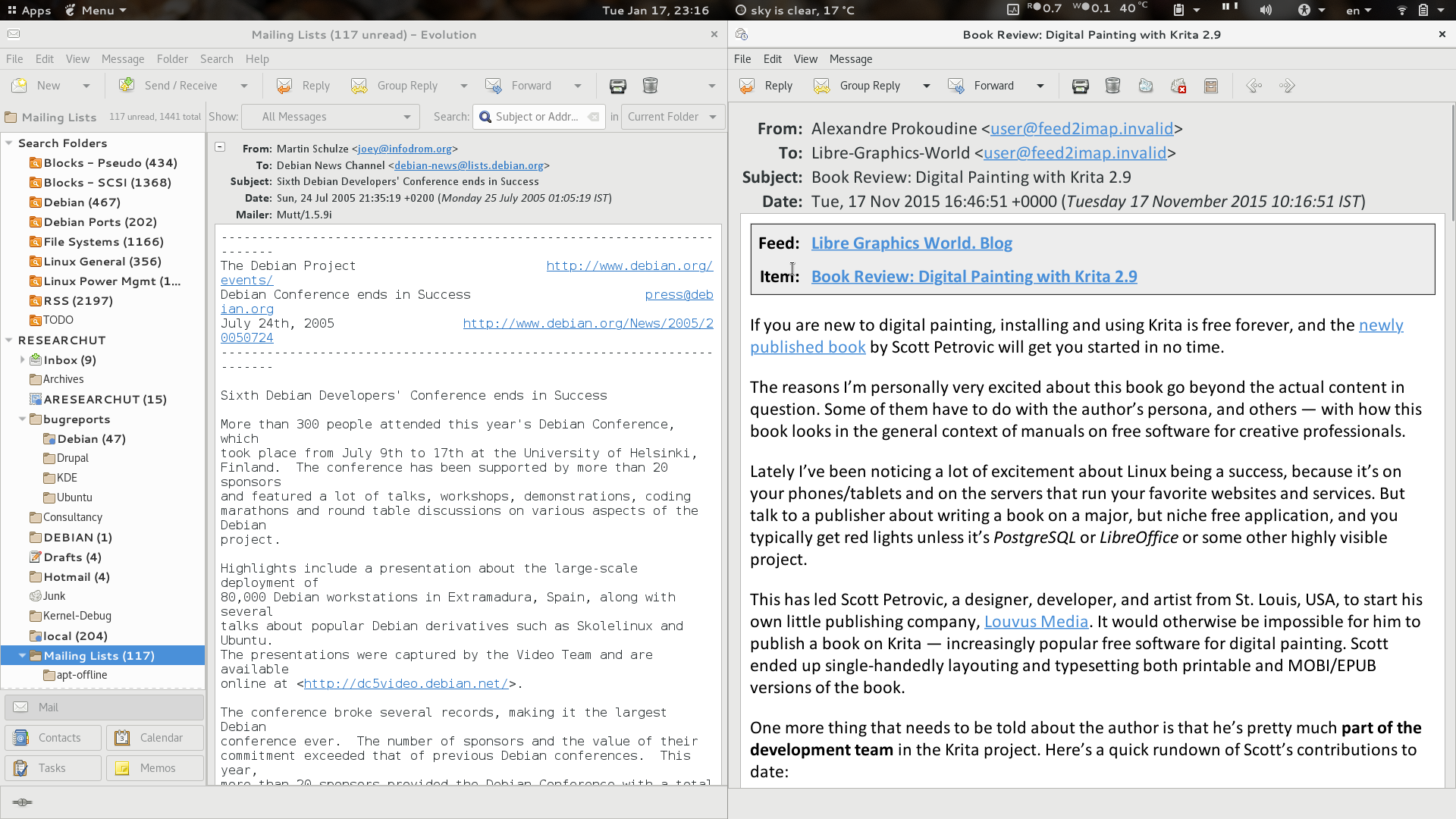
      • Above is a screenshot of 2 windows of Evoluiton. In its current form too, Evolution is a gem at times. For my RSS feeds, they are stored in a VFolder in Evolution, so that I can read them when offline. RSS feeds are something I read up in Tablet-mode. On the right is an Evolution window with larger fonts, while on the left, Evoltuion still retains its default font size. This current behavior helps me get Table-Mode Touch working to an extent. In my wishful thoughts, I wish if Evolution provided flexibility to change Toolbar icon sizes. That’d really help easily touch the delete button when in Tablet Mode. A simple button, Tablet Mode , like what SMPlayer has done, would keep users sticky with Evolution.

My wishful thought is that people write (free) software, thinking more about usability across toolkits and desktop environments. Otherwise, the year of the Linux desktop , laptop , tablet; in my opinion, is yet to come. And please don’t rip apart tools, in porting them to newer versions of the toolkits. When you rip a tool, you also rip all its QA, Bug Reporting and Testing, that was done over the years.

[Read More]

Laptop Mode Tools 1.71

I am pleased to announce the 1.71 release of Laptop Mode Tools. This release includes some new modules, some bug fixes, and there are some efficiency improvements too. Many thanks to our users; most changes in this release are contributions from our users.

A filtered list of changes in mentioned below. For the full log, please refer to the git repository.

Source tarball, Feodra/SUSE RPM Packages available at:
https://github.com/rickysarraf/laptop-mode-tools/releases

Debian packages will be available soon in Unstable.

[Read More]

LIO -fb in Debian

LIO -fb is the new SCSI Target for Debian. Previously, we maintained the LIO tools from the pre-fork upstream branch. But, with good reasons, we’ve now moved to the newer -fb (Free Branch).

As the maintainer for those pacakges, I have a local LIO setup. Overy the years, I’ve been tuning and using this setup with a bunch of SCSI clients. Now with the new -fb packages it was worrisome for me, on how to migrate (Note: migration is not supported by the Debian packages) my old setup to the new one.

[Read More]
Categories: Debian-Blog Computing Tools  Tags: LIO scsi Storage migration 

SAN Updates for Debian Stretch

Now that we prepare for the next Debian Stable release (Stretch), it is time to provide some updates on what the current state of some of the (storage related) packages in Debian is. This is not an update on the complete list of packages related to storage, but it does cover some of them.

REMOVALS

  • iscsitarget - The iscsitarget stood as a great SCSI target for the Linux kernel. It seems to have had a good user base not just in Linux but also with VMWare users. But this storage target was always out-of-tree. With LIO having gotten merged as the default in-kernel SCSI Target, development on iscsitarget seems to have stalled. In Debian, for Stretch, there will be no iscsitarget. The package is already removed from Debian Testing and Debian Unstable, and nobody has volunteered to take over it.
  • system-storage-manager - This tool intended to be a simple unified storage tool, through which one could work with various storage technologies like LVM, BTRFS, cryptsetup, SCSI etc. But the upstream development hasn’t really been much lately. For Debian Stable, it shouldn’t be part of it, given it has some bugs.
  • libstoragemgmt - libstoragemgmt is a universal storage client-side library to talk to remote Storage Arrays. The project is active upstream. For Debian, the package is out-of-date and, now, also needs a maintainer. Unless someone picks up this package, it will not be part of Debian Stretch.

UPDATES

[Read More]

apt-offline 1.7.2 released

I am happy to announce the release of apt-offline 1.7.2. This has turned out in time for the next release of Debian, i.e. Debian Stretch.

A long standing cosmetic issue in CLI of the progress bar total item count has been fixed. There are also a bunch of other bug fixes, for which the specifics are present in the git logs.

Also, in this release, we’ve tried to catch-up on the Graphical Interface, adding the GUI equivalent of the features, that were added to apt-offline in the recent past.

[Read More]

GNOME Shell Extensions and Chromium

Most GNOME users may be using one or more extensions for the GNOME Shell. These extensions allow extending functionality for the shell, or modify default behavior, to suit the taste of many users, who may want more than the default. Having flexibility to customize the desktop to ones personal need is a great feature, and the extensions help achieve them.

The GNOME Shell Extensions distribution mechanism is primarily through the web. I think they aspire to achieve something similar to Chrome’s Web Store. Up till recently, the ability to install those Shell Extensions was a) Through your distribution channel, where your distribution may have packaged some of the extensions. b) Through the Firefox web browser. GNOME Shell Extensions installation from the web, to most of what I’m aware of, until recently, only worked with Firefox browser.

[Read More]

Laptop Mode Tools 1.70

I’m pleased to announce the release of Laptop Mode Tools, version 1.70. This release adds support for AHCI Runtime PM, introduced in Linux 4.6. It also includes many important bug fixes, mostly related to invocation and determination of power states.

Changelog:

1.70 - Sat Sep 24 16:51:02 IST 2016
* Deal harder with broken battery states
* On machines with 2+ batteries, determine states from all batteries
* Limit status message logging frequency. Some machines tend to send
ACPI events too often. Thanks Maciej S. Szmigiero
* Try harder to determine power states. As reports have shown, the
power_supply subsystem has had incorrect state reporting on many machines,
for both, BAT and AC.
* Relax conditional events where Laptop Mode Tools should be executed. This
affected for use cases of Laptop being docked and undocked
Thanks Daniel Koch.
* CPU Hotplug settings extended
* Cleanup states for improved Laptop Mode Tools invocation
Thanks: Tomas Janousek
* Align Intel P State default to what the actual driver (intel_pstate.c)
uses
Thanks: George Caswell and Matthew Gabeler-Lee
* Add support for AHCI Runtime PM in module intel-sata-powermgmt
* Many systemd and initscript fixes
* Relax default USB device list. This avoids the long standing issues with
USB devices (mice, keyboard) that mis-behaved during autosuspend

[Read More]

apt-offline 1.7.1 released

I am happy to mention the release of apt-offline, version 1.7.1.

This release includes many bug fixes, code cleanups and better integration.

  • Integration with PolicyKit
  • Better integration with apt gpg keyring
  • Resilient to failures when a sub-task errors out
  • New Feature: Changelog
    • This release adds the ability to deal with package changelogs (’ set ’ command option: --generate-changelog ) based on what is installed, extract changelog (Currently support with python-apt only) from downloaded packages and display them during installation (’ install ’ command opiton: --skip-changelog , if you want to skip display of changelog)
  • New Option: --apt-backend
    • Users can now opt to choose an apt backend of their choice. Currently support: apt, apt-get (default) and python-apt

Hopefully, there will be one more release, before the release to Stretch.

[Read More]

User Mode Linux

Recently, we had the User-Mode Linux suite out of Debian, which included user- mode-linux, user-mode-linux-doc and uml-utilities package. We are happy that we were able to bring it back into the archvie quick, and hope to maintain it active.

For many who may not know about UML, here’s a discription from its website:

User-Mode Linux is a safe, secure way of running Linux versions and Linux processes. Run buggy software, experiment with new Linux kernels or distributions, and poke around in the internals of Linux, all without risking your main Linux setup.

User-Mode Linux gives you a virtual machine that may have more hardware and software virtual resources than your actual, physical computer. Disk storage for the virtual machine is entirely contained inside a single file on your physical machine. You can assign your virtual machine only the hardware access you want it to have. With properly limited access, nothing you do on the virtual machine can change or damage your real computer, or its software.

Most of the use cases mentioned here are achievable with Containers today. The big difference UML provides in, is with a separate kernel. UML is an implementation of Linux as an architecture of Linux itself. It supports x86 and x86_64 architecture. And given that it is the port of the kernel, you can do many of the tests and experiments of the regular kernel, safely inside a confined UML environment. As with other virtualization implementations, the limitation comes in if you are working on physical hardware.

[Read More]

Fully SSL for my website

I finally made full switch to SSL for my website. Thanks to [this](https://hblok.net/blog/posts/2016/02/24/lets-encrypt-tls-certificate- setup-for-apache-on-debian-7/) simple howto on Let’s Encrypt. I had to use the upstream git repo though. The Debian packaged tool, letsencrypt.sh, did not have enough documentation/pointers in place. And finally, thanks to the Let’s Encrypt project as a whole.

PS: http is now redirected to https. I hope nothing really breaks externally.

Categories: Debian-Blog General Computing  Tags: SSL https eff