knetstats for Debian Etch/Sid
Posted on November 12, 2006
(Last modified on January 22, 2011)
|
|
0 comment
Debian is a great OS Distribution. It itself is a great community. But there
are times when Debian is very frustrating also. Like many of the packages go
on a very slow pace.
Truly speaking, there isn’t much a person can ask the Debian community given
the amount of contribution it makes.
I was looking for knetstats package but couldn’t find much help. The ITP
against knetstats is more than 100 days but still not entered into Debian. And
on the knetstats page, the debian package mentioned is outdated.
[Read More]root-tail on KDE desktop
Posted on November 12, 2006
(Last modified on January 22, 2011)
|
|
0 comment
For many who don’t know, root-tail is a small utility which can write to your
Desktop’s Screen (Often called the root window). It is mainly used to display
critical system messages.
I’ve been a root-tail fan for long. It like the idea of displaying syslog
messages on my desktop. It almost fixes 50% of my problems.
The problem with KDE is that it drwas its own Desktop image on top of the root
window because of which you can’t see the messages drawn by root-tail. But KDE
is something I’m an addict of and can’t live without. But recently I realised
that KDE already had the framework in place for applications like root-tail.
[Read More]SSH Password-less login
Posted on August 12, 2006
(Last modified on January 22, 2011)
|
|
0 comment
First generate a public key
		1.rrs@geeKISSexy:~$ ssh-keygen -t dsa
                2.Generating public/private dsa key pair.
                3.Enter file in which to save the key (/home/rrs/.ssh/id_dsa):
                4.Created directory '/home/rrs/.ssh'.
                5.Enter passphrase (empty for no passphrase):
                6.Enter same passphrase again:
                7.Your identification has been saved in /home/rrs/.ssh/id_dsa.
                8.Your public key has been saved in /home/rrs/.ssh/id_dsa.pub.

Enter the command "ssh-keygen -t dsa" (line 1.).
When prompted on file where key is saved just hit "Enter" (line 3.).
When prompted for a passphrase just hit "Enter" (line 5.).
When prompted to confirm passphrase hit "Enter" a second time (line 6.).
Once you have created your public key you can copy it to the server.


                1.rrs@geeKISSexy:~$ ssh-copy-id -i ~/.ssh/id_dsa.pub rrs@learner
                25
                3.The authenticity of host 'learner (192.168.1.1)' can't be established.
                4.RSA key fingerprint is 8a:8a:53:b3:1c:d6:72:b5:e9:e8:7d:c7:81:8c:6f:0b.
                5.Are you sure you want to continue connecting (yes/no)? yes
                6.Warning: Permanently added 'learner' (RSA) to the list of known hosts.
                7.rrs@learner's password:
                8.Now try logging into the machine, with "ssh 'rrs@learner'", and check in:

Enter the command "ssh-copy-id -i [location of key] [username@server IP] (line 1.).
You may get some complaints due to defaults but when prompted to continue enter "yes" (line 5.).
You will next be prompted to enter the user's password (line 7.). Remember the user password must be the same on the the client and server
Finally you will be asked to see if you can log in via ssh on the server (line 8.).
If everything is correct you should now be able to log in on the server in a your user account without having to enter a password.


                rrs@geeKISSexy:~$ ssh rrs@learner
                Last login: Sat Aug 12 11:21:54 2006
Bye Bye Bootsplash
Posted on July 13, 2006
(Last modified on January 22, 2011)
|
|
0 comment
Wow!
This is called freedom. **Bootsplash **has been a great eye-candy
application in the Linux arena but now it’s time to say goodbye.
I just tried splashy and its a charm. The great thing is that it doesn ’t
need a patched kernel. So newbies or people who don’t prefer to rollout their
own kernel can use splashy and have a clean boot up.
pypt-offline 0.6.Beta Released
Posted on July 9, 2006
(Last modified on January 22, 2011)
|
|
0 comment
I’m happy that a new release has been possible.
This new release is almost a complete re-write and has many fixes and
features.
For details, visit:
http://pypt-offline.sf.net
There’s also a small HOWTO about pypt-offline
Cheers!
Ritesh
pypt-offline – An Offline Package Manager
(C) 2005, 2006 Ritesh Raj Sarraf rrs@researchut.com
INTRODUCTION
So you’ve decided to give this small piece of work a try.
Good ! Let’s get it done faster.
pypt-offline is an offline package management tool written in the Python
Programming Language. This program, as of now, is intended for people using
Debian (And Debian based) systems.
[Read More]Software Suspend 2 with root/swap on LVM
Posted on July 7, 2006
(Last modified on January 22, 2011)
|
|
0 comment
Disclaimer: YMMV
I had always had failures with Software Suspend 2 (swsusp2) on my laptop
because of which I had a perception that it really wasn’t ready for use for
beta users also. But recently after reading the comments of many users on LWN
I felt how wrong I actuall was.
Anyways, setting up swsusp2 with root/swap on LVM is a little tricky. From my
past experience I’ve felt that to be the major reason for me to not able to
use this excellent feature.
[Read More]Pivot at its best
Posted on May 2, 2006
(Last modified on January 22, 2011)
|
|
0 comment
It really is amazing to see no more spam coming to my blog. Kudos to the Pivot
team who’ve done a great job integrating spam features into this great
software. Also the spam cleanup utility (integrated into the application) is
excellent. Thanks.
Customizing Gallery ver 1
Posted on December 4, 2005
(Last modified on January 22, 2011)
|
|
0 comment
Customizing Gallery ver 1 is as simple as adding your HTML code into
respective wrapper.header.html and wrapper.footer.html files at the
end, after all the PHP code, in the html_wrap directory.
Simple, Isn’t it!
New SSH Session in Konsole
Posted on October 2, 2005
(Last modified on January 22, 2011)
|
|
0 comment
Some quick steps to create an Option for “New SSH Session” under Konsole which
includes keychain and ssh-agent for password-less ssh logins.
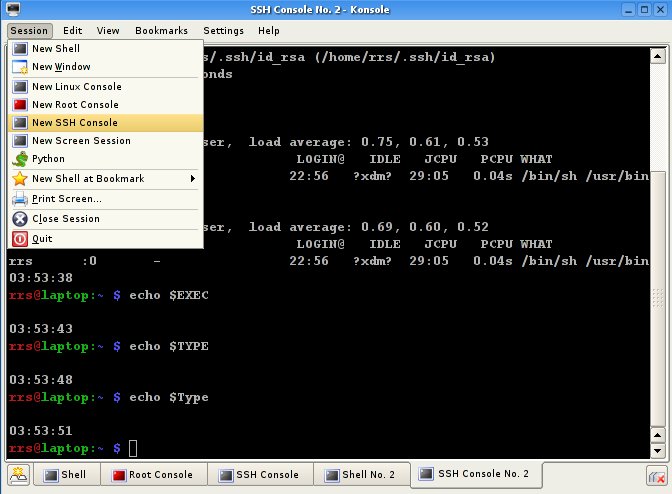
I’m using a Debian system but majority of the steps should be common across
all distributions.
Install keychain and openssl-client programs (ssh-agent is part of openssl-
client package under Debian)
rrs@laptop:~ $ apt-get install keychain openssl-client
Add the following lines to your .bashrc file
For SSH
For now I’m gambling the linux session for ssh-agent.
I’ll have to find a better way in the future. 30/09/2005
if [ $TERM == linux ]; then
[Read More]
POP3 SSL && Fetchmail
Posted on October 2, 2005
(Last modified on January 22, 2011)
|
|
0 comment
Small HOWTO on configuring POP3 SSL with Fetchmail.
Here I assume that the server’s SSL certificate is a Self Signed Certificate
- openssl s_client -connect mail.logicalwebhost.com:995 -showcerts
Execute this command to fetch the details of the server and also the
certificate.
The output will be something like below:
rrs@laptop:~ $ openssl s_client -connect mail.someserver.com:995 -showcerts
CONNECTED
depth=0 /C=US/ST=CA/L=San Jose/O=Some Internet Hosting Services/OU
=Automatically-generated POP3 SSL
key/CN=mail.somehost.com/emailAddress=postmaster@researchut.com
verify error:num=18:self signed certificate
verify return:1
depth=0 /C=US/ST=CA/L=San Jose/O=Some Internet Hosting Services/OU
=Automatically-generated POP3 SSL
key/CN=mail.somehost.com/emailAddress=postmaster@researchut.com
verify return:1
Certificate chain 0 s:/C=US/ST=CA/L=San Jose/O=Some Internet Hosting
Services/OU=Automatically-generated POP3 SSL
key/CN=mail.somehost.com/emailAddress=postmaster@researchut.com
i:/C=US/ST=CA/L=San Jose/O=Some Internet Hosting Services/OU=Automatically-
generated POP3 SSL
key/CN=mail.somehost.com/emailAddress=postmaster@researchut.com
[Read More]