Laptop Mode Tools 1.74

Power Savings tool for Linux

Laptop Mode Tools 1.74

Laptop Mode Tools version 1.74 has been released. This release includes important bug fixes, some defaults settings updated to current driver support in Linux and support for devices with nouveau based nVIDIA cards.

A filtered list of changes is mentioned below. For the full log, please refer to the git repository

1.74 - Sat Jul 18 19:10:40 IST 2020

* With 4.15+ kernels, Linux Intel SATA has a better link power
  saving policy, med_power_with_dipm, which should be the recommended
  one to use
* Disable defaults for syslog logging
* Initialize LM_VERBOSE with default to disabled
* Merge pull request #157 from rickysarraf/nouveau
* Add power saving module for nouveau cards
* Disable ethernet module by default
* Add board-specific folder and documentation
* Add execute bit on module radeon-dpm
* Drop unlock because there is no lock acquired

Resources

What is Laptop Mode Tools

Description: Tools for Power Savings based on battery/AC status
 Laptop mode is a Linux kernel feature that allows your laptop to save
 considerable power, by allowing the hard drive to spin down for longer
 periods of time. This package contains the userland scripts that are
 needed to enable laptop mode.
 .
 It includes support for automatically enabling laptop mode when the
 computer is working on batteries. It also supports various other power
 management features, such as starting and stopping daemons depending on
 power mode, automatically hibernating if battery levels are too low, and
 adjusting terminal blanking and X11 screen blanking
 .
 laptop-mode-tools uses the Linux kernel's Laptop Mode feature and thus
 is also used on Desktops and Servers to conserve power

Laptop Mode Tools 1.73

Laptop Mode Tools: Power Savings Tool for Linux

Laptop Mode Tools 1.73

I am pleased to announce the release of Laptop Mode Tools version 1.73

This release includes many bug fixes. For user convenience, 2 command options have been added.

rrs@priyasi:~$ laptop_mode -h
****************************
Following user commands are understood
status      :   Display a Laptop Mode Tools power savings status
power-stats  :  Display the power statistics on the machine
power-events :  Trap power related events on the machine
help        :   Display this help message (--help, -h)
version     :   Display program version (--version, -v)
****************************
15:22 ♒ ॐ  ☺ 😄    


rrs@priyasi:~$ sudo laptop_mode status
[sudo] password for rrs: 
Mounts:
   /dev/mapper/nvme0n1p4_crypt on / type btrfs (rw,noatime,compress=zstd:3,ssd,space_cache,autodefrag,subvolid=5,subvol=/)
   /dev/nvme0n1p3 on /boot type ext4 (rw,relatime)
   /dev/nvme0n1p1 on /boot/efi type vfat (rw,relatime,fmask=0077,dmask=0077,codepage=437,iocharset=ascii,shortname=mixed,utf8,errors=remount-ro)
   /dev/fuse on /run/user/1000/doc type fuse (rw,nosuid,nodev,relatime,user_id=1000,group_id=1000)
 
Drive power status:
   Cannot read /dev/[hs]d[abcdefgh], permission denied - /usr/sbin/laptop_mode needs to be run as root
 
(NOTE: drive settings affected by Laptop Mode cannot be retrieved.)
 
Readahead states:
   /dev/mapper/nvme0n1p4_crypt: 128 kB
   /dev/nvme0n1p3: 128 kB
   /dev/nvme0n1p1: 128 kB
 
Laptop Mode Tools is allowed to run: /var/run/laptop-mode-tools/enabled exists.
 
/proc/sys/vm/laptop_mode:
   0
 
/proc/sys/vm/dirty_ratio:
   40
 
/proc/sys/fs/xfs/xfssyncd_centisecs:
   3000
 
/proc/sys/vm/dirty_background_ratio:
   10
 
/proc/sys/vm/dirty_expire_centisecs:
   3000
 
/proc/sys/vm/dirty_writeback_centisecs:
   500
 
......SNIPPED......

/sys/devices/system/cpu/cpu0/cpufreq/cpuinfo_cur_freq:
   400000
 
/sys/devices/system/cpu/cpu5/cpufreq/cpuinfo_max_freq:
   2001000
 
/sys/devices/system/cpu/cpu0/cpufreq/scaling_governor:
   schedutil
 
/sys/devices/system/cpu/cpu7/cpufreq/scaling_governor:
   schedutil
 
/proc/acpi/button/lid/LID0/state:
   state:      open
 
/sys/class/power_supply/AC/online:
   1
 
/sys/class/power_supply/BAT0/status:
   Charging
 
15:22 ♒ ॐ  ☺ 😄    


rrs@priyasi:~$ laptop_mode power-stats
Power Supply details for /sys/class/power_supply/AC

P: /devices/LNXSYSTM:00/LNXSYBUS:00/ACPI0003:00/power_supply/AC
L: 0
E: DEVPATH=/devices/LNXSYSTM:00/LNXSYBUS:00/ACPI0003:00/power_supply/AC
E: POWER_SUPPLY_NAME=AC
E: POWER_SUPPLY_ONLINE=1
E: SUBSYSTEM=power_supply

Power Supply details for /sys/class/power_supply/BAT0

P: /devices/LNXSYSTM:00/LNXSYBUS:00/PNP0C0A:00/power_supply/BAT0
L: 0
E: DEVPATH=/devices/LNXSYSTM:00/LNXSYBUS:00/PNP0C0A:00/power_supply/BAT0
E: POWER_SUPPLY_NAME=BAT0
E: POWER_SUPPLY_STATUS=Charging
E: POWER_SUPPLY_PRESENT=1
E: POWER_SUPPLY_TECHNOLOGY=Li-poly
E: POWER_SUPPLY_CYCLE_COUNT=0
E: POWER_SUPPLY_VOLTAGE_MIN_DESIGN=7600000
E: POWER_SUPPLY_VOLTAGE_NOW=8760000
E: POWER_SUPPLY_CURRENT_NOW=545000
E: POWER_SUPPLY_CHARGE_FULL_DESIGN=6842000
E: POWER_SUPPLY_CHARGE_FULL=6592000
E: POWER_SUPPLY_CHARGE_NOW=6526000
E: POWER_SUPPLY_CAPACITY=98
E: POWER_SUPPLY_CAPACITY_LEVEL=Normal
E: POWER_SUPPLY_MODEL_NAME=DELL G8VCF6C
E: POWER_SUPPLY_MANUFACTURER=SMP
E: POWER_SUPPLY_SERIAL_NUMBER=1549
E: SUBSYSTEM=power_supply

15:23 ♒ ॐ  ☺ 😄    


rrs@priyasi:~$ laptop_mode power-events
Running Laptop Mode Tools in event tracing mode. Press ^C to interrupt
monitor will print the received events for:
UDEV - the event which udev sends out after rule processing
KERNEL - the kernel uevent

KERNEL[140321.536870] change   /devices/LNXSYSTM:00/LNXSYBUS:00/ACPI0003:00/power_supply/AC (power_supply)
ACTION=change
DEVPATH=/devices/LNXSYSTM:00/LNXSYBUS:00/ACPI0003:00/power_supply/AC
SUBSYSTEM=power_supply
POWER_SUPPLY_NAME=AC
POWER_SUPPLY_ONLINE=0
SEQNUM=5908

KERNEL[140321.569526] change   /devices/LNXSYSTM:00/LNXSYBUS:00/PNP0C0A:00/power_supply/BAT0 (power_supply)
ACTION=change
DEVPATH=/devices/LNXSYSTM:00/LNXSYBUS:00/PNP0C0A:00/power_supply/BAT0
SUBSYSTEM=power_supply
POWER_SUPPLY_NAME=BAT0
POWER_SUPPLY_STATUS=Discharging
POWER_SUPPLY_PRESENT=1
POWER_SUPPLY_TECHNOLOGY=Li-poly
POWER_SUPPLY_CYCLE_COUNT=0
POWER_SUPPLY_VOLTAGE_MIN_DESIGN=7600000
POWER_SUPPLY_VOLTAGE_NOW=8761000
POWER_SUPPLY_CHARGE_FULL_DESIGN=6842000
POWER_SUPPLY_CHARGE_FULL=6592000
POWER_SUPPLY_CHARGE_NOW=6526000
POWER_SUPPLY_CAPACITY=98
POWER_SUPPLY_CAPACITY_LEVEL=Normal
POWER_SUPPLY_MODEL_NAME=DELL G8VCF6C
POWER_SUPPLY_MANUFACTURER=SMP
POWER_SUPPLY_SERIAL_NUMBER=1549
SEQNUM=5909

UDEV  [140321.577770] change   /devices/LNXSYSTM:00/LNXSYBUS:00/ACPI0003:00/power_supply/AC (power_supply)
ACTION=change
DEVPATH=/devices/LNXSYSTM:00/LNXSYBUS:00/ACPI0003:00/power_supply/AC
SUBSYSTEM=power_supply
POWER_SUPPLY_NAME=AC
POWER_SUPPLY_ONLINE=0
SEQNUM=5908
USEC_INITIALIZED=140321550931

UDEV  [140321.582123] change   /devices/LNXSYSTM:00/LNXSYBUS:00/PNP0C0A:00/power_supply/BAT0 (power_supply)
ACTION=change
DEVPATH=/devices/LNXSYSTM:00/LNXSYBUS:00/PNP0C0A:00/power_supply/BAT0
SUBSYSTEM=power_supply
POWER_SUPPLY_NAME=BAT0
POWER_SUPPLY_STATUS=Discharging
POWER_SUPPLY_PRESENT=1
POWER_SUPPLY_TECHNOLOGY=Li-poly
POWER_SUPPLY_CYCLE_COUNT=0
POWER_SUPPLY_VOLTAGE_MIN_DESIGN=7600000
POWER_SUPPLY_VOLTAGE_NOW=8761000
POWER_SUPPLY_CHARGE_FULL_DESIGN=6842000
POWER_SUPPLY_CHARGE_FULL=6592000
POWER_SUPPLY_CHARGE_NOW=6526000
POWER_SUPPLY_CAPACITY=98
POWER_SUPPLY_CAPACITY_LEVEL=Normal
POWER_SUPPLY_MODEL_NAME=DELL G8VCF6C
POWER_SUPPLY_MANUFACTURER=SMP
POWER_SUPPLY_SERIAL_NUMBER=1549
SEQNUM=5909
USEC_INITIALIZED=140321580812

KERNEL[140324.857185] change   /devices/LNXSYSTM:00/LNXSYBUS:00/ACPI0003:00/power_supply/AC (power_supply)
ACTION=change
DEVPATH=/devices/LNXSYSTM:00/LNXSYBUS:00/ACPI0003:00/power_supply/AC
SUBSYSTEM=power_supply
POWER_SUPPLY_NAME=AC
POWER_SUPPLY_ONLINE=1
SEQNUM=5912

UDEV  [140324.916156] change   /devices/LNXSYSTM:00/LNXSYBUS:00/ACPI0003:00/power_supply/AC (power_supply)
ACTION=change
DEVPATH=/devices/LNXSYSTM:00/LNXSYBUS:00/ACPI0003:00/power_supply/AC
SUBSYSTEM=power_supply
POWER_SUPPLY_NAME=AC
POWER_SUPPLY_ONLINE=1
SEQNUM=5912
USEC_INITIALIZED=140324887055

KERNEL[140324.917955] change   /devices/LNXSYSTM:00/LNXSYBUS:00/PNP0C0A:00/power_supply/BAT0 (power_supply)
ACTION=change
DEVPATH=/devices/LNXSYSTM:00/LNXSYBUS:00/PNP0C0A:00/power_supply/BAT0
SUBSYSTEM=power_supply
POWER_SUPPLY_NAME=BAT0
POWER_SUPPLY_STATUS=Unknown
POWER_SUPPLY_PRESENT=1
POWER_SUPPLY_TECHNOLOGY=Li-poly
POWER_SUPPLY_CYCLE_COUNT=0
POWER_SUPPLY_VOLTAGE_MIN_DESIGN=7600000
POWER_SUPPLY_VOLTAGE_NOW=8622000
POWER_SUPPLY_CHARGE_FULL_DESIGN=6842000
POWER_SUPPLY_CHARGE_FULL=6592000
POWER_SUPPLY_CHARGE_NOW=6526000
POWER_SUPPLY_CAPACITY=98
POWER_SUPPLY_CAPACITY_LEVEL=Normal
POWER_SUPPLY_MODEL_NAME=DELL G8VCF6C
POWER_SUPPLY_MANUFACTURER=SMP
POWER_SUPPLY_SERIAL_NUMBER=1549
SEQNUM=5913

UDEV  [140324.922916] change   /devices/LNXSYSTM:00/LNXSYBUS:00/PNP0C0A:00/power_supply/BAT0 (power_supply)
ACTION=change
DEVPATH=/devices/LNXSYSTM:00/LNXSYBUS:00/PNP0C0A:00/power_supply/BAT0
SUBSYSTEM=power_supply
POWER_SUPPLY_NAME=BAT0
POWER_SUPPLY_STATUS=Unknown
POWER_SUPPLY_PRESENT=1
POWER_SUPPLY_TECHNOLOGY=Li-poly
POWER_SUPPLY_CYCLE_COUNT=0
POWER_SUPPLY_VOLTAGE_MIN_DESIGN=7600000
POWER_SUPPLY_VOLTAGE_NOW=8622000
POWER_SUPPLY_CHARGE_FULL_DESIGN=6842000
POWER_SUPPLY_CHARGE_FULL=6592000
POWER_SUPPLY_CHARGE_NOW=6526000
POWER_SUPPLY_CAPACITY=98
POWER_SUPPLY_CAPACITY_LEVEL=Normal
POWER_SUPPLY_MODEL_NAME=DELL G8VCF6C
POWER_SUPPLY_MANUFACTURER=SMP
POWER_SUPPLY_SERIAL_NUMBER=1549
SEQNUM=5913
USEC_INITIALIZED=140324922572

^C
15:24 ♒ ॐ   ☹ 😟=> 130  

A filtered list of changes is mentioned below. For the full log, please refer to the git repository.

[Read More]
Laptop Mode Tools 1.72

What a way to make a gift!

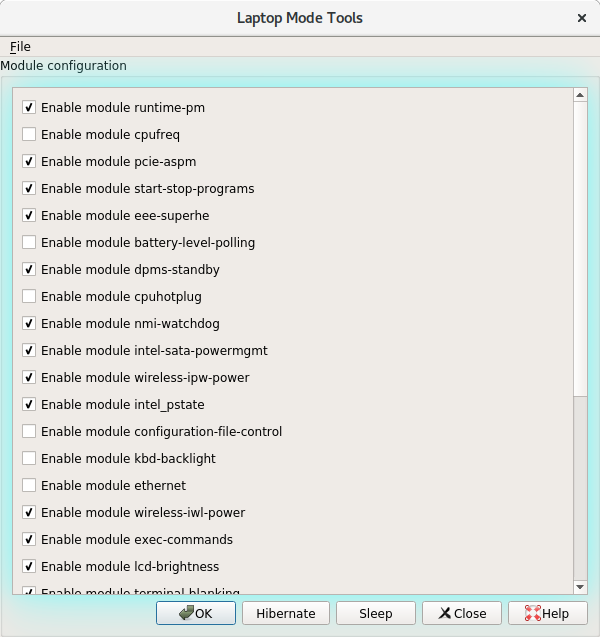
I’m pleased to announce the 1.72 release of Laptop Mode Tools. Major changes include the port of the GUI configuration utility to Python 3 and PyQt5. Some tweaks, fixes and enhancements in current modules. Extending {black,white}list of devices to types other than USB. Listing of devices by their devtype attribute.

A filtered list of changes is mentioned below. For the full log, please refer to the git repository.

[Read More]

Laptop Mode Tools 1.71

I am pleased to announce the 1.71 release of Laptop Mode Tools. This release includes some new modules, some bug fixes, and there are some efficiency improvements too. Many thanks to our users; most changes in this release are contributions from our users.

A filtered list of changes in mentioned below. For the full log, please refer to the git repository.

Source tarball, Feodra/SUSE RPM Packages available at:
https://github.com/rickysarraf/laptop-mode-tools/releases

Debian packages will be available soon in Unstable.

[Read More]

Laptop Mode Tools 1.70

I’m pleased to announce the release of Laptop Mode Tools, version 1.70. This release adds support for AHCI Runtime PM, introduced in Linux 4.6. It also includes many important bug fixes, mostly related to invocation and determination of power states.

Changelog:

1.70 - Sat Sep 24 16:51:02 IST 2016
* Deal harder with broken battery states
* On machines with 2+ batteries, determine states from all batteries
* Limit status message logging frequency. Some machines tend to send
ACPI events too often. Thanks Maciej S. Szmigiero
* Try harder to determine power states. As reports have shown, the
power_supply subsystem has had incorrect state reporting on many machines,
for both, BAT and AC.
* Relax conditional events where Laptop Mode Tools should be executed. This
affected for use cases of Laptop being docked and undocked
Thanks Daniel Koch.
* CPU Hotplug settings extended
* Cleanup states for improved Laptop Mode Tools invocation
Thanks: Tomas Janousek
* Align Intel P State default to what the actual driver (intel_pstate.c)
uses
Thanks: George Caswell and Matthew Gabeler-Lee
* Add support for AHCI Runtime PM in module intel-sata-powermgmt
* Many systemd and initscript fixes
* Relax default USB device list. This avoids the long standing issues with
USB devices (mice, keyboard) that mis-behaved during autosuspend

[Read More]

Laptop Mode Tools 1.69 Released

Today is an auspicious day. For those who know (or follow) the Hindu religion will be familiar; Today is Maha Shivaratri![](/images/LMT-Maha- Shivaratri.jpeg)

On this day, It is great delight for me to be able to release Laptop Mode Tools, version 1.69

This release adds on many bug fixes and some enhancements. There is a new module (disabled by default) for cpuhotplug. The release tarball also includes a basic PolicyKit file for convenience, that packagers can use for the Laptop Mode Tools Graphical Configuration Interface. Apart from the policykit file, the graphical invocation script has been slightly fine tuned to work under pkexec and sudo. Some defaults have been tuned based on user requests - This should improve in situations where your External USB Mouse/Keyboard used to suspend after idle time periods.

[Read More]

Linux Power Savings 2016

Having moved to a new place, now at times, I also have to deal with power outages. As heat increases, the power outages will be much longer and more frequent. So much, that UPS and Power Inverters run out. Such are ideal times to measure idle power consumption for my laptop.

Here’s what my default (and idle) OS looks like. It should be standard to most “typical” users. Some minor odds could be apport, dnsmasq, and maybe, tor. Also, thanks to systemd, there are some native services which are now converted to socket activation based ones. There’s also Laptop Mode Tools for userspace power savings. But huge thanks to Intel’s work in making the kernel more power efficient. With things like Runtime PM and Intel P-State , we can now define, default and aggressive power-savings modes, helping conserve more power.

[Read More]

Laptop Mode Tools 1.68.1

I am please to announce the release of Laptop Mode Tools 1.68.1.

The last release (1.68) was mostly about systemd integration, and so is this release. There were a couple of bugs reported, and most of them fixed, with this release. All downstreams are requested to upgrade.

For RPM packages for Fedora and OpenSUSE (Tumbleweed), please see the homepage.

1.68.1 - Sun Sep 27 14:00:13 IST 2015

    * Update details about runtime-pm in manpage

    * Revert "Drop out reload"

    * Log error more descriptively

    * Write to common stderr. Do not hardcode a specific one

    * Call lmt-udev in lmt-poll. Don't call the laptop_mode binary directly.

      Helps in a lot of housekeeping

    * Direct stderr/stdout to journal

    * Fix stdout descriptor

    * Install the new .timer and poll service

    * Use _sbindir for RPM
Categories: Debian-Blog Tools  Tags: laptop-mode-tools 

Laptop Mode Tools - 1.68

I am please to announce the release of Laptop Mode Tools, version 1.68.

This release is mainly focused on integration with the newer init system, systemd. Without the help from the awesome Debian systemd maintainers, this would not have been possible. Thank you folks.

While the focus now is on systemd, LMT will still support the older SysV Init.

With this new release, there are some new files: laptop-mode.service, laptop- mode.timer and lmt-poll.service. All the files should be documented well enough for users. lmt-poll.service is the equivalent of the module battery- level-polling , should you need it.

[Read More]

Laptop Mode Tools 1.67

I am pleased to announce the release of Laptop Mode Tools, version 1.67.

This release has many important bug fixes, and everyone is recommended to upgrade. Of the many, one important fix is to, more reliably check for Device Mapper based devices, which is common these days with Crypt and LVM.

For the summary of changes to quote from git log:

1.67 - Thu Jul  2 17:05:07 IST 2015
    * Relax minimum window size to accomodate low res screens
    * Fix variable name to comply with our "constants" assuptions
    * Get more aggressive in power saving for Intel HD Audio
    * Account Device Mapper devices
    * Add swsusp freeze support
    * Switch battery-level-polling default to True
    * Detect ethernet carrier, early and relibaly
    * changes the boolean setting *_ACTIVATE_SATA_POWER to a customizable
      *_SATA_POLICY, with backward-compatible defaults and documentation
      Thanks Yuir D'Elia

PS: On a side note, over the years, Linux’s power savings functionality has improved a lot, all thanks to its use in the mobile worlds. At the same time, because of more companies shipping drivers depending on external firmware, stability has become less reliable. And to add to that, bare functionality of devices typically ask for disabling, you know what, LPM.

[Read More]
Categories: Debian-Blog Tools  Tags: laptop-mode-tools